
Requirements
Credentials: Create a Personal token under Profile → Personal Token in the OneX dashboard. Your operator may instead provide a shared forwarder secret for legacy deployments. Copy the full value when it is shown; you cannot retrieve it later.
sudo (macOS). Hooks, spool files, and IDE configuration are written to your user profile.
The installer registers Cursor, Claude Code, and VS Code Copilot capture in one step. No additional configuration is required in the GUI.
What to expect
The installer opens a single window titled Install OneX Governance. Enter your connection details, click Install, and watch the Progress log for status.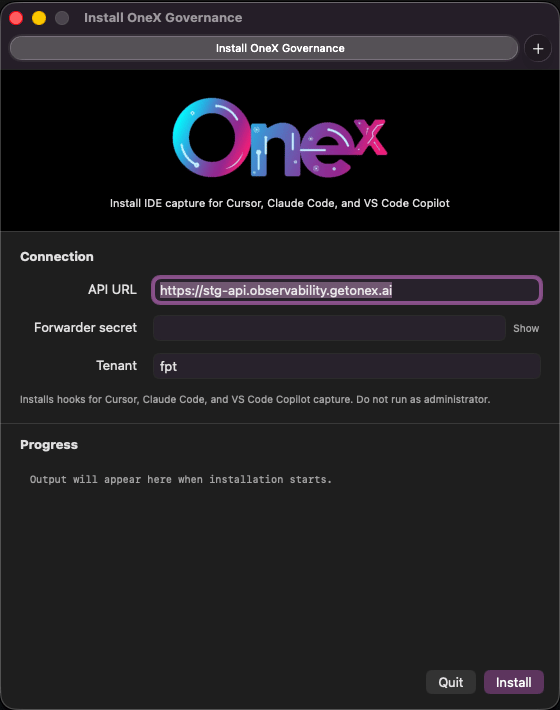
The subtitle confirms scope: Install IDE capture for Cursor, Claude Code, and VS Code Copilot.
When installation succeeds, the footer shows Installed successfully and the Progress log lists next steps (restart Cursor, Claude Code, and VS Code). Fully quit each application before reopening. A window reload is not sufficient.
Windows
- Unzip
OneXGovernance-Windows.zipto a local folder (for exampleDownloads\OneX Governance). - Double-click
Install OneX Governance.exe. - Enter API URL (
http://10.243.138.252/api), Personal token (or forwarder secret), and Tenant, then click Install. - Wait for Installed successfully in the footer and review the Progress log.
- Fully quit and reopen Cursor, Claude Code, and Visual Studio Code.
macOS
- Open
OneXGovernance-macOS-<arch>.dmgfrom your organization (arm64for Apple Silicon,x86_64for Intel). - Double-click
Install OneX Governance.app. - Enter API URL (
http://10.243.138.252/api), Personal token, and Tenant, then click Install. - Wait for Installed successfully and review the Progress log.
- Fully quit and reopen Cursor, Claude Code, and Visual Studio Code.
sudo.
After installation
- Confirm the installer reported Installed successfully.
- Fully restart the IDEs you use.
- Exercise your assistant (Agent mode, Copilot chat, or Claude Code).
- Confirm events appear in the governance dashboard.
GitHub Copilot in VS Code: The installer configures the OneX VS Code extension, Copilot proxy, and capture settings automatically. No separate Copilot setup is required. The first time you open VS Code after installation, it may restart once while the extension applies its settings. This is normal.